

 Loading...
How Does HSTS Work?
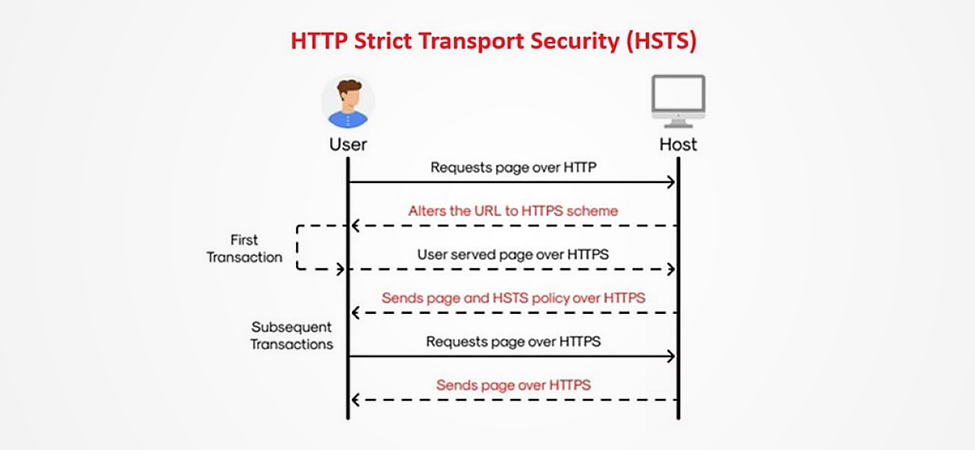
HSTS instructs browsers to only communicate with a server using HTTPS, even if the user attempts to access it via HTTP.
Meanwhile, HSTS Preload is a feature that allows websites to be included in a hardcoded list maintained by major browsers. In simple words, this means that when users visit your site for the first time, their browser will automatically enforce HTTPS before any requests are made, minimizing potential vulnerabilities.
How To Enable the HSTS Header & HSTS Preload
Step 1: Install Your Trusted SSL Certificate
To begin with, you need to obtain and install an SSL certificate. Here you can find an SSL certificate depending on your needs: SSL/TLS products
Generate a key pair: Certificate Signing Request (CSR) and the Private Key. The key pair may be generated using the online tools, such as CheapSSLSecurity CSR Generator.
Then, follow the instructions provided on the order to complete your purchase. You will need to provide the contact information, as well as generate a Certificate Signing Request (CSR) to complete the order generation.
Depending on your certificate type, you will need to pass domain verification OR domain + organization verification. Here you will find more detailed information regarding the validation process.
Once approved, download the certificate files provided on the order page, and you will get a certificate, an Intermediate, and a Root certificate file.
You will need to install the files on your web server. Unfortunately, there is no one single instruction on how to install the certificate, as each server has a unique procedure for certificate installation. Here you will find the instructions for the most popular ones: Installation Instructions
Update your server configuration files to ensure that HTTPS is enforced. For Apache servers, you might edit the .htaccess file; for Nginx, you would modify the server block.
Related articles: Apache CentOS 8, Apache CentOS 6-7, Nginx, Apache OpenSSL.
Verify that your SSL certificate is correctly installed and configured. You may use our SSL Checker
Step 2: Ensure That Your Entire Website Works via HTTPS
After your domain is added to the HSTS list, users will be unable to access your website via HTTP in any browser.
Be sure that your entire domain (and subdomains) is 100% HTTPS – no HTTP URLs, no mixed content, etc.
Step 3: Enable HSTSWhen the SSL certificate is installed and your entire site is running on HTTPS, you can enable HSTS:
- Add HSTS Header: You need to add the HSTS header to your server’s configuration. For example, in Apache, you would add the following line to your .htaccess file:
Header always set Strict-Transport-Security “max-age=31536000; includeSubDomains; preload”
For Nginx, you would add it to your server block:
add_header Strict-Transport-Security “max-age=31536000; includeSubDomains; preload” always;Note: Here, max-age=31536000 specifies that browsers should remember this rule for one year (in seconds). The includeSubDomains directive applies HSTS to all subdomains as well.
- Test Your Configuration: Use online tools like HSTS Preload (https://hstspreload.org/) or Security Headers (https://securityheaders.com/) to verify that your HSTS header is correctly set.
Step 4: Submit Your Site for HSTS Preload
Once you’ve enabled HSTS, you can submit your site for inclusion in the HSTS Preload list:
- Visit the HSTS Preload Submission Page: Go to hstspreload.org.

- Fill Out the Form: Enter your domain name and ensure that all requirements are met:
- Your domain must serve an HTTPS response.
- You must have the Strict-Transport-Security header set with a max-age of at least 31536000.
- The includeSubDomains directive must be present.
- The site must not allow HTTP connections.
- Submit Your Domain: Once you’ve confirmed that all criteria are satisfied, submit your domain for review.
- Wait for Approval: It may take some time before your site appears in the preload list across browsers.

Conclusion
In the constantly evolving landscape of web security, simply having an SSL installed on your server may not be enough. To truly safeguard your users and improve your website’s credibility, we advise you to consider enabling HSTS and submitting your site for HSTS Preload. There are just a few simple steps that need to be done to increase user trust and safety. Don’t miss that opportunity!
*Commands in different operating systems may vary or may not be available at all.