
When we talk about web security, especially in the context of HTTPS and SSL/TLS certificates, we’ll often mention root and intermediate.
They may seem similar at first glance, but their roles in the PKI are very different.
Understanding the difference between root vs. intermediate certificates is key to understanding how web security works.
This screenshot shows (in order), a root, intermediate, and leaf certificate:
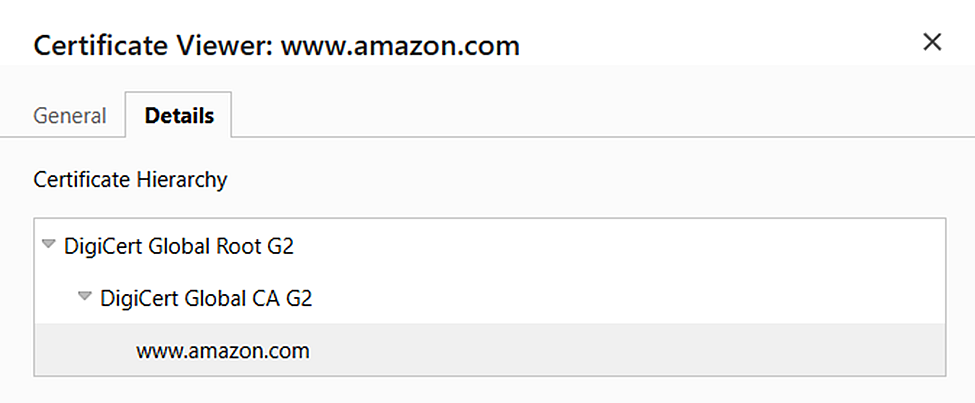
As you can see, in this case the root and intermediate certificates have similar names, so let’s take a look at the differences.
What Is a Root Certificate?
A root certificate is the top of the trust hierarchy. It is self-signed and stored in the trusted stores of operating systems and browsers. These certificates belong to root certificate authorities (Root CAs), such as DigiCert, Sectigo, or GlobalSign. The companies that operate root CAs are subject to rigorous vetting and security requirements, as one compromised root certificate can undermine the trust of many sites.
What Do Intermediate Certificates Do?
Intermediate certificates are created and signed by the root CA (or in some cases another intermediate). Their job is to act as a link between the root and the final certificates that are issued to sites. This is not just an additional link, but an important layer of protection: if an intermediate certificate is compromised, it can be revoked without affecting the root, which remains trusted by millions of devices.
Why Does It Work This Way?
The separation into root and intermediate certificates helps minimize risks. The root CA is not used directly to issue site certificates – it remains in deep isolation to reduce the risk of compromise. Instead, its “delegates” – intermediate CAs – sign and issue SSL certificates. This cascading delegation is called a chain of trust.
Chain of Trust In Practice
When you visit a site, the browser checks not only the site’s SSL certificate itself, but also the chain leading to the root. If even one link is missing or invalid, the connection will not be considered secure. Therefore, it is important for site owners to correctly configure the server, adding not only their certificate but also the entire package of intermediate certificates.
Here’s how the chain of trust works when you visit a website:
- Verify website certificate: Your browser verifies that the provided SSL certificate was signed by an intermediate certificate the browser has a copy of (either provided by the website or in the browser’s cache).
- Verify intermediate certificate: Your browser verifies what root certificate signed the intermediate certificate
- Verify root certificate: Your browser checks its trust store to determine if the root certificate is in its list of trusted CAs. If it’s not, your browser will reject the website’s SSL certificate.
How To See Root & Intermediate Certificates in Google Chrome
When visiting a website that uses HTTPs, follow these steps to see which root and intermediate CAs issued that website’s certificate:
- Click the site information icon next to the domain in the address bar.
- Click Connection is secure
- Click Certificate is valid
- Click Details
- Look at the Certificate Hierarchy section: the root certificate will be at the top, the website/leaf certificate at the bottom, and the intermediate certificate(s) in-between.
Summing Up Root vs. Intermediate CAs
The division into root and intermediate certificates is not a mere formality, but a well-thought-out security architecture. The root CA is the basis of trust, and intermediate ones are its shield and tool. Together, they create a flexible and stable infrastructure, without which the modern Internet would be vulnerable and unreliable.