
If you’ve ever installed an SSL certificate before, you have probably encountered files with PEM or PFX extensions.
Today, we are going to clarify what PEM and PFX files are designed for and what their differences are. To start with, let’s just say that these serve different purposes and have distinct characteristics.

PEM
PEM (Privacy Enhanced Mail) represents a format for storing and sending cryptographic keys and certificates. PEM files are typically encoded in Base64 and are easily recognizable by their header and footer lines, such as:
—–BEGIN CERTIFICATE—–
—–END CERTIFICATE—–
PEM files can contain various types of data, including:
- Digital certificates
- Private keys
- Certificate signing requests (CSRs)
- Entire certificate chains
One of the advantages of PEM files is their simplicity and ease of use. They can be easily created and manipulated using text editors, such as Notepad, making them a favorite among developers and system administrators. Most commonly, PEM files are used in Linux and other Unix-based systems.
PFX
PFX (Personal Information Exchange), also known as PKCS#12, is a binary format that can store an entire certificate chain along with the associated Private Key in a single file. This is particularly useful for applications that require both the certificate and its Private Key to be contained in one secure package. PFX files are often used in Windows (e.g., Microsoft IIS) environments and may be protected with a password to enhance security.
Key Differences Between PEM and PFX
| PEM | PFX | |
| Format | ASCII (text-based) | Binary |
| Structure | Single or multiple files | Single file |
| Content | Certificates, keys, CSRs | Certificates + Private Key |
| Security | No inherent encryption | Password-protected |
| Compatibility | Widely compatible | Primarily Windows-focused |
How to convert PEM to PFX Using OpenSSL. You can securely convert files on your server using OpenSSL (this is more secure than using a tool hosted elsewhere).
IMPORTANT!
The commands below using these placeholder values:
- certificate.pem – your certificate
- cabundle.pem – CA bundle (Intermediate and Root certificates)
- privatekey.pem – Private Key
- certificateandkey.pfx – the PFX file you will get
Please use the actual file names in the prompt.
Convert PFX to PEM
Use this OpenSSL command to securely convert a PFX file to PEM:
IMPORTANT! The PFX stores the server certificate, intermediate certificates, and the private key in one encryptable file, so as a result, you will get a PEM file that will also include all the mentioned certificates/keys. Please also do not forget to replace the “example” with the actual file names.
Convert PEM to PFX
Use this OpenSSL command to securely convert a PEM file to PFX:
To check the PFX File:
You can double check the converted file using OpenSSL:
How to Convert Using an Online Tool
Or, you can use online tools like SSL Shopper (https://www.sslshopper.com/ssl-converter.html), here you can easily convert the files to PFX by uploading them in PEM or different formats.
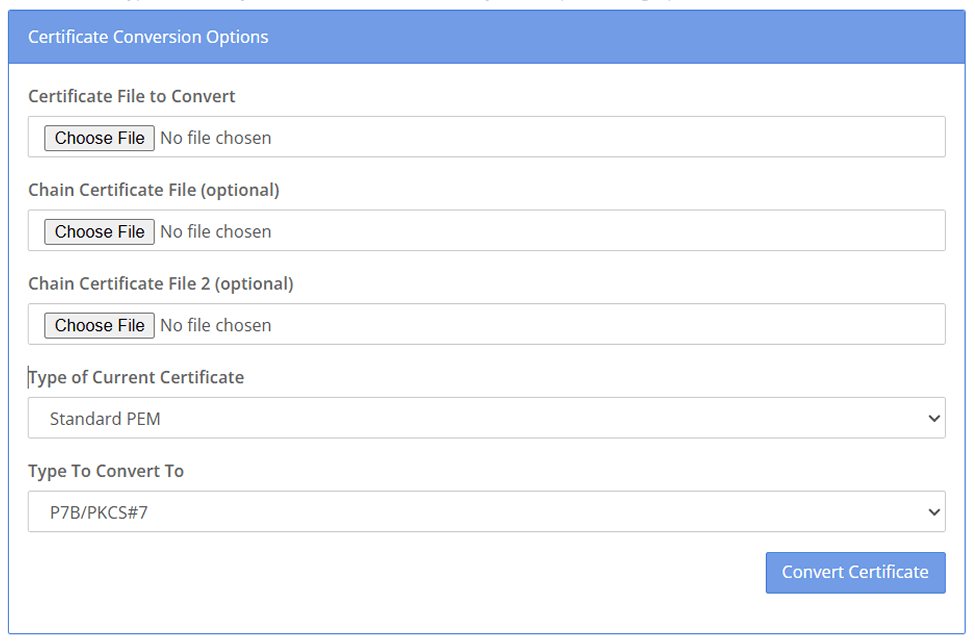
- Go to SSL Converter Tool
- Select “Type of Current Certificate” -> Standard PEM and “Type To Convert To” -> PFX/PKCS#12
- Attach Private key, CA intermediate certificates, and .CRT ( certificate)
- Type the password for the PFX file OR just ignore this option
Click on Convert and you will receive the combined file in the PFX format.
PEM or PFX. How to Decide?
Use PEM when:
- You need flexibility and ease of use.
- You are working in a Linux/Unix environment.
- You want to manage individual components (like a separate certificate/private key).
Use PFX when:
- You require a complete package of certificates and private keys.
- You are operating in a Windows environment.
- You want built-in security features like password protection.