
Understand how HTTPS protects your site and why it’s now the standard for every secure website
If you’re wondering what the difference is between HTTP and HTTPS, you’re not alone. Many website owners, developers, and even casual internet users want to know: Is HTTPS really better than HTTP? (Spoiler: Yes.) Why is HTTPS better?
This guide explains the 8 major differences between HTTP and HTTPS—from how they handle security, SEO, and user trust to performance and compatibility.
What Is HTTP?
HTTP (HyperText Transfer Protocol) is the foundation of data communication on the web. When you visit a website that uses HTTP, the data exchanged between your browser and the server is sent in plain text—meaning anyone who intercepts that data (like on public Wi-Fi) can read it.
Example URL:
http://example.tld
Key characteristics of HTTP:
- No data encryption
- Vulnerable to man-in-the-middle (MitM) attacks
- Flagged as “Not Secure” by modern browsers
What Is HTTPS?
HTTPS (HyperText Transfer Protocol Secure) is the secure version of HTTP. It uses SSL/TLS encryption to protect the data exchanged between your browser and the website server. This ensures that even if someone intercepts the traffic, they can’t read or modify it.
Example URL:
https://example.tld
Key characteristics of HTTPS:
- Encrypts all data transmitted
- Authenticates the server with a digital certificate
- Builds trust with users and browsers
- Enables access to modern web features
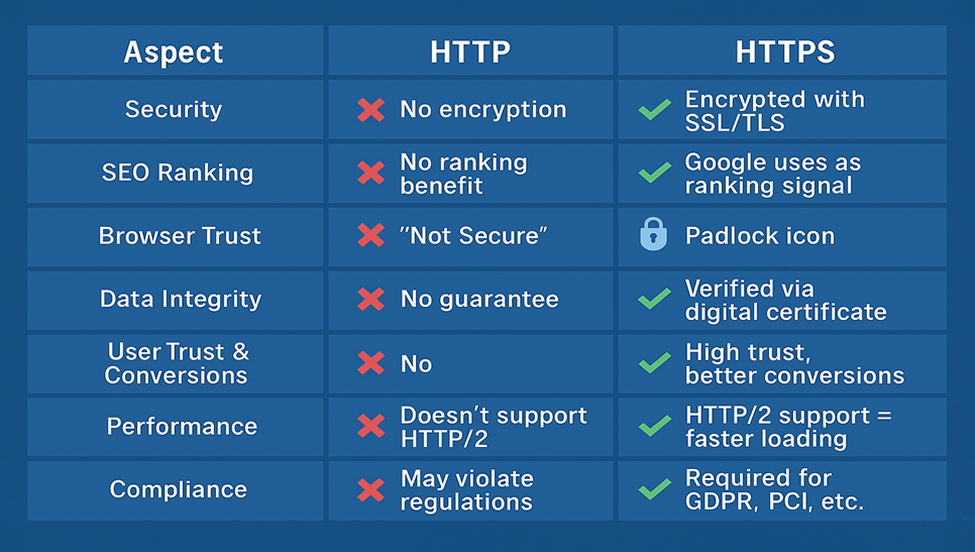
HTTP vs HTTPS: 8 Key Differences
| Aspect | HTTP | HTTPS |
| Security | No encryption; data is exposed to eavesdropping | Encrypts data with SSL/TLS to prevent interception and tampering |
| SEO Ranking | No ranking benefit | Google uses HTTPS as a positive ranking signal |
| Browser Trust Indicators | Displays a “Not Secure” warning in most browsers | Shows a padlock or the default site information icon, signaling safety and trustworthiness |
| Data Integrity | Data can be intercepted and altered in transit | Ensures transmitted data cannot be modified unnoticed |
| Authentication | No way to verify if the site is real or fake | Uses digital certificates to confirm a site’s legitimacy |
| User Trust & Conversions | Users may abandon the site due to lack of trust | Enhances credibility and encourages form submissions and purchases |
| Performance | Does not support modern protocols like HTTP/2 or QUIC | Enables faster load times using HTTP/2, multiplexing, and other features |
| Compliance & Compatibility | May violate data privacy laws like GDPR or PCI DSS | Required for regulatory compliance and access to modern browser APIs |
Why You Should Switch to HTTPS Now
If your website still runs on HTTP, you’re not just behind the times—you’re putting users at risk. Google, major browsers, and modern web standards expect HTTPS by default.
Benefits of switching to HTTPS:
- Stronger security and privacy
- Higher SEO rankings
- Improved user trust and engagement
- Access to cutting-edge web features
- Compliance with security regulations
How to Upgrade to HTTPS
To enable HTTPS, you need to install an SSL/TLS certificate from a trusted Certificate Authority (CA). Providers like CheapSSLSecurity.com offer affordable and trusted options.
Steps to enable HTTPS:
- Purchase SSL certificate.
- Install it on your web server.
- Redirect all traffic from HTTP to HTTPS (301 redirects).
- Update internal links and resources.
- Re-submit your sitemap and update analytics tools.
Summary: HTTPS Is the Standard for a Safe, Modern Web
Bottom line: If you care about user safety, reputation, and search visibility, it’s time to go HTTPS.
Helpful Resources for Redirecting to HTTPS
If you’re ready to switch but need help configuring redirects, check out these detailed guides from CheapSSLSecurity.com:
These step-by-step tutorials will ensure your visitors are always securely connected via HTTPS.
Final thoughts
Choosing HTTPS is no longer optional—it’s a necessity for protecting your site and your users. As we’ve seen, HTTPS clearly outperforms HTTP in every major category, from encryption and SEO to performance and user trust. Understanding these differences helps you make informed decisions about your website’s future. Make the switch today and build a safer, faster, and more trustworthy online experience.