
Files with the extensions .CER and .CRT refer to X.509 certificates, which are used for encryption and authentication on the Internet.
Although they contain the same data, the differences between them lie in the encoding format and traditional usage on different operating systems.
What is the difference between .CER and .CRT?
1.Coding Format
Certificates can be presented in two formats:
- DER — binary;
- PEM — text (Base64 with delimiters —–BEGIN CERTIFICATE—– and —–END CERTIFICATE—–).
Both extensions can contain files in any of these formats.
2.Traditional Usage
- .CRT – most used in Linux and Unix-based systems.
- .CER – common in Windows, especially in the Microsoft environment.
In practice, both formats can be used interchangeably if the system supports the required encoding.
How to convert .CRT to .CER and vice versa.
Sometimes it is necessary to convert one format to another, for example, so that the certificate is correctly recognized on a certain platform. This can be done using any text editor or OpenSSL utility.
1. Conversion via text editor.
If the certificate is in PEM format (i.e. it can be opened in a text editor), you can simply change the extension manually.
- STEP 1.
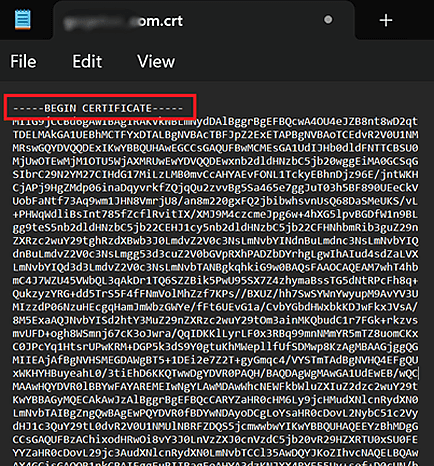
Open the certificate.cer (or .crt) file in Notepad, Notepad++, VS Code or another text editor.

- STEP 2.
Make sure the content starts with —–BEGIN CERTIFICATE—– and ends with —–END CERTIFICATE—–

- STEP 3.
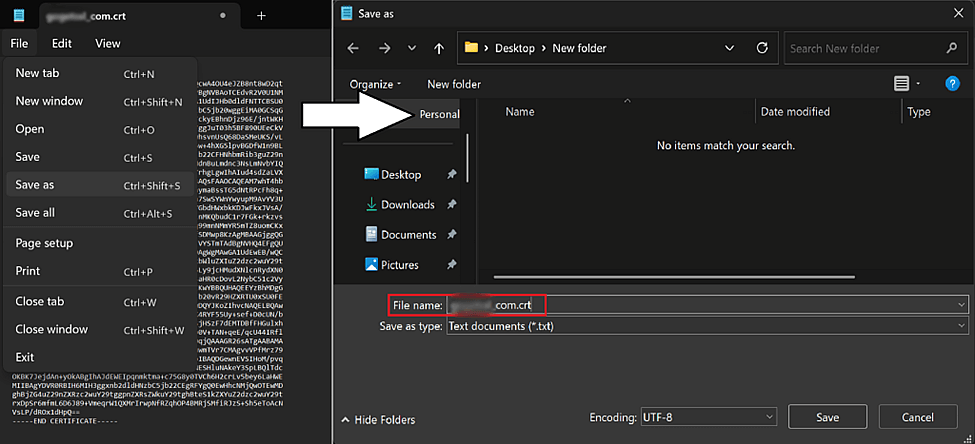
Select “Save As”, and enter a new file name, replacing the extension (.cer → .crt or vice versa).
- STEP 4.
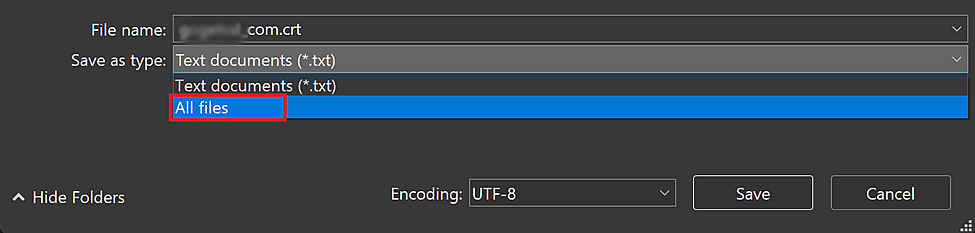
In the “Save as type” field, select “All files” to avoid the automatic addition of .txt.
- STEP 5.
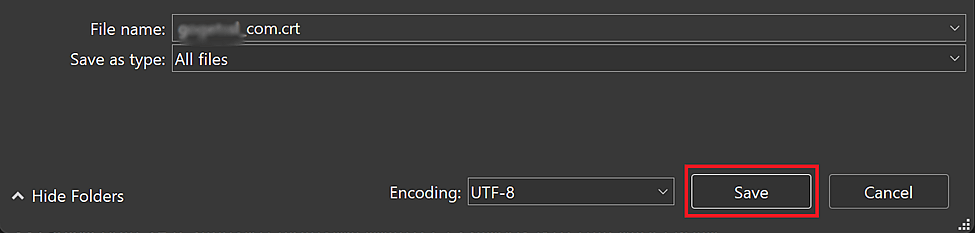
Click “Save”.
This method is only suitable for certificates in PEM format. If the file is DER encoded, it must be converted via OpenSSL.
2. Conversion via OpenSSL.
You can use the OpenSSL utility to convert certificates.
Convert .CRT to .CER
- If the certificate is encoded in PEM:
openssl x509 -in certificate.crt -out certificate.cer
- If you want the binary DER format:
openssl x509 -in certificate.crt -outform der -out certificate.cer
Convert .CER to .CRT
Conclusion
The .CER and .CRT files are identical and can be used interchangeably depending on the operating system. To convert, you can either rename the file manually (if it is in PEM format) or use OpenSSL to change the encoding format.